NEA Discount Marketplace
Cash Back powered by 
Shop here to find the best discounts for teachers and educators at over 3,500 stores. Plus, get exclusive cash back deals only for NEA members.
Spend $25 or more at any qualifying Rakuten store, and receive a $10 Welcome Bonus... just for joining!1
Want to see how NEA Discount Marketplace works? Watch this short video.
Choose online shopping as your choice category
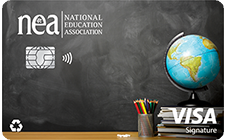
Use the NEA® Customized Cash Rewards Credit Card when you shop the NEA Marketplace to earn 3% cash back + 3% first-year cash back bonus in choice categories like online shopping. Maximize your cash back by stacking the Marketplace deals and discounts with this 6% cash back offer!
Browse Cash Back Stores
Accessories
All Accessories
Handbags & Wallets
Hats & Hair Accessories
Jewelry
Luggage
Glasses & Contacts
Phone Cases & Tech
Sunglasses
Auto & Tires
All Auto & Tires
Auto Detailing & Car Care
Auto Electronics
Auto Maintenance & Parts
Automotive Tools & Equipment
Auto Accessories
Car Safety & Car Security
Motorcycles & ATVs
Oils and Fluids
RVs
Tires
Baby & Toddler
All Baby & Toddler
Baby & Toddler Furniture
Nursing & Feeding
Car Seats & Strollers
Diapers & Supplies
Clothing
All Clothing
Outerwear
Kid's & Baby Clothing
Maternity Clothing
Men's Clothing
Plus Sizes
Activewear
Swimwear
Underwear
Women's Clothing
Electronics
All Electronics
Speakers & Audio
Cameras & Video
Cell Phones
Computers & Tablets
Printers, Ink & Scanners
TV & Home Theater
Video Games
Wearable Tech
Events & Entertainment
All Events & Entertainment
Books, Music & Media
Concert Tickets
Local Activities
Food, Drinks & Restaurants
All Food, Drinks & Restaurants
Coffee
Desserts & Sweets
Restaurants & Dining
Gourmet Food
Groceries & Food Boxes
Wine & Bar
Health & Beauty
All Health & Beauty
Bath & Body
Makeup & Cosmetics
Fitness & Nutrition
Perfume & Fragrances
Hair Care
Health Care
Medicine & Drugs
Skincare
Spa
Vitamins & Supplements
Home & Garden
All Home & Garden
Bed & Bath
Home Decor & Furniture
Gardening Tools & Equipment
Appliances
Home Improvement
Lighting
Outdoor Decor & Furniture
Office Supplies
All Office Supplies
Business Tools
Finance & Tax Prep
Office Furniture
Printing services
Pets
All Pets
Pet Food
Pet Insurance & Medication
Pet Toys & Accessories
Shoes
All Shoes
Kid's & Baby Shoes
Men's Shoes
Women's Shoes
Sports, Outdoors & Fitness
All Sports, Outdoors & Fitness
Boating
Camping & Hiking
Climbing
Cycling
Home Exercise & Fitness Plans
Running
Winter Activities
Sports Gear
Yoga
Digital Services & Streaming
All Digital Services & Streaming
Network, Cloud & Security
Online Courses
Phone & Internet Providers
Streaming Entertainment
Video & Photo Services
Subscription Boxes & Services
All Subscription Boxes & Services
Baby & Kids
Beauty & Lifestyle
Clothing & Accessories
Fitness & Wellness
Food & Drink
Pets & Home
Toys & Games
All Toys & Games
Baby Toys & Activity Equipment
Building Toys
Dolls, Playsets & Toy Figures
Educational Toys
Games
Outdoor Play Equipment
There are no stores available
You haven't selected any favorite stores yet!
It's easy to get fast access to discount offers from the places where YOU prefer to shop. Click the little heart ❤ in the top-right corner of any retailer to make it one of your favorites. The next time you view "My Favorite Stores", you will be able to quickly save more as you shop!
Don't worry if your tastes or needs change! You can add or remove stores from your favorites list by clicking the heart again.
FAQs
Your questions, answered
Earning Cash Back is easy!
- Make sure you’re registered and signed in to your neamb.com account. Once you register, you’ll create a Rakuten account on Rakuten.com.
- Browse Exclusive Offers and thousands of other top retailers on this page and click on the store where you want to shop. (Note: In order to earn Cash Back, you’ll need to have cookies enabled in your web browser.)
- Be sure to click the “Activate Cash Back” button on the retailer’s page before placing items in your cart. Once you complete an order, Rakuten will automatically add Cash Back to your account.
- You can choose whether you would like Rakuten to send your Cash Back via check or to a PayPal account. Remember to set your address and choose your payment type in My Account on Rakuten.com.
That’s all you have to do.
Once the store confirms your purchase, Rakuten will add your Cash Back to your account and notify you. It usually takes a little time for the store to confirm that your purchase was completed. Depending on the store, this can take from a few hours to several days. Every three months, Rakuten sends you the Cash Back you’ve earned, either by check or via PayPal. If Cash Back for an order is still pending approval, it will carry over to your next payment.
To earn Cash Back for online purchases, you must start shopping at the NEA Discount Marketplace and click the link to your favorite store.
You know you’re earning Cash Back if you click on the activate Cash Back link and get a confirmation pop-up that Cash Back at that store is now active. Look for the pop-up confirmation before you shop.
You can visit Cash Back Balance to verify that you earned Cash Back on a purchase. Rakuten usually can’t report Cash Back immediately at the time of purchase because it takes time for the store to provide notification that you placed an order. Depending on the store, this can take anywhere from a few hours to several days.
Once the store confirms that you’ve made a purchase, Rakuten will add Cash Back to your account and notify you. At that point, the amount will be viewable in your Cash Back Balance.
There are a few things to know about earning Cash Back:
- Cash Back rates are indicated on the offer tile for each store.
- Cash Back rates can change daily according to the current promotion.
- To earn Cash Back, stay signed in while using the Cash Back links and completing your Shopping Trip.
- In order to earn Cash Back online, you must create a Rakuten account and also be signed into your neamb.com account.
- Multiple accounts are not permitted.
- If you visit other websites before completing your purchase or use coupons not provided by Rakuten, your purchase might be associated with a service other than Rakuten and you might not earn Cash Back on your purchase. If you've disabled cookies on your computer, you'll need to enable them. Without enabling cookies, won't earn Cash Back because cookies are used to identify your account and verify eligibility.
Follow these steps to receive your Cash Back:
- Add an address to your account. A mailing address is required for accurate and timely payments of all types, including PayPal. You can add or update your current address in your Rakuten Account Settings.
- Earn Cash Back that adds up to more than $5.00* before the next Cash Back payment period (see timetable below). If your approved Cash Back is $5.00 or less, it'll carry over to the following period. Visit My Account on Rakuten to check the status of Cash Back for any order.
*To be included in your next payment, Cash Back must be approved by the store you purchased from.
Cash Back payments are sent every three months, based on the schedule below:
|
Purchases Posted Between |
Check Sent |
|
Jan 1 - Mar 31 |
May 15 |
|
Apr 1 - June 30 |
Aug 15 |
|
July 1 - Sept 30 |
Nov 15 |
|
Oct 1 - Dec 31 |
Feb 15 |
If the email address you use to sign in on neamb.com is the same email address you use for Rakuten, just sign up through the NEA Discount Marketplace and you’ll automatically have access to NEA-exclusive offers.
If the email address you use to sign in on neamb.com is different from the email address you currently use for your Rakuten account, you can either create a new, separate Rakuten account through NEA Discount Marketplace or you can contact Rakuten and ask them to consolidate your accounts. Please note: The email address you use to sign in on neamb.com is the only one that enables you to access NEA-exclusive offers. If you consolidate your accounts under the email address you do not use to sign in to neamb.com you will not have access to the exclusive offers available through the NEA Discount Marketplace.
If you made a purchase and don’t see Cash Back in your account, it may be due to one of these reasons:
- Using coupons you found outside of Rakuten. Using or even attempting to use any coupon codes, offers or promotions that are not on Rakuten can void your Cash Back. There could be conflicts between Cash Back and the discounts offered by other coupon sites, exclusive emails or rewards programs.
- Visiting other sites during your shopping session. Going to other sites, especially ones that offer shopping rewards, coupons or discounts, can result in the store giving the credit for your purchase to another site. In addition, browser extensions from other shopping programs can interfere with linking your purchase to your Rakuten account.
- Switching to a different browser window or tab. You should only use the initial tab opened for you by Rakuten at the beginning of your shopping session. If you complete your purchase in a different tab or window, we may be unable to link your purchase to your Rakuten account.
- Waiting too long after activating Cash Back to complete your purchase. Additionally, some stores do not allow us to link a purchase to your Rakuten account if items were added to your shopping cart before you activated Cash Back. It’s best to activate Cash Back before adding items to your cart and check out as soon as you can.
- Not activating Cash Back when using the Button extension. On the store site, make sure to click “Activate Cash Back” before you start shopping. If you don’t see the “Activate Cash Back” button, then that store may not be available for the extension and you should activate Cash Back from Rakuten.com. Learn more about stores and the Button extension.
- Longer store reporting times. Stores must report your order information to Rakuten, so they know how much Cash Back to add to your account. Reporting time can range from a few hours to up to 3 months for travel bookings. To see a store’s reporting time, check its store page on Rakuten.com
- Ineligible store categories or products. Some stores limit Cash Back to certain categories or products. You may have purchased an item that’s not Cash Back eligible. To see a store’s eligible categories, check its store page on Rakuten.com.
All returns and cancellations are subject to each store’s specific policy. Returned or canceled orders may void Cash Back and will be deducted from your Cash Back balance, depending on the store’s policy. If a store processes your exchanged order as a cancellation and a new transaction is created, the exchange may be treated as a canceled order.
To ensure you receive Cash Back on exchanged orders, you can instead return the item and place an entirely new order at that store. Just make sure to start your shopping with neamb.com or Rakuten.